Like many people with hearing loss, using the telephone has been a difficult task for me for a very long time. I was given a lot of different advice over the years, most of which was along the times of holding the handset to my ear at a particular angle but which never ever seemed to work that great. Thinking back to the number of times I bluffed my way through phone conversations with a ‘yep’, ‘uhuh’ or ‘okay’ said randomly when I had little idea what the other person was saying, I am truly amazed that I got away with it for so long. (or did I???)
Around mid-2017, a few months after I had my cochlear implant, I discovered a device called a ‘Telephone Recording Adapter’ which, as the name implies, was designed to record a telephone conversation (for whatever reason that someone would want to do that). The added bonus to this device however is that it can make telephone conversations significantly easier for people who use hearing aids and/or cochlear implants.
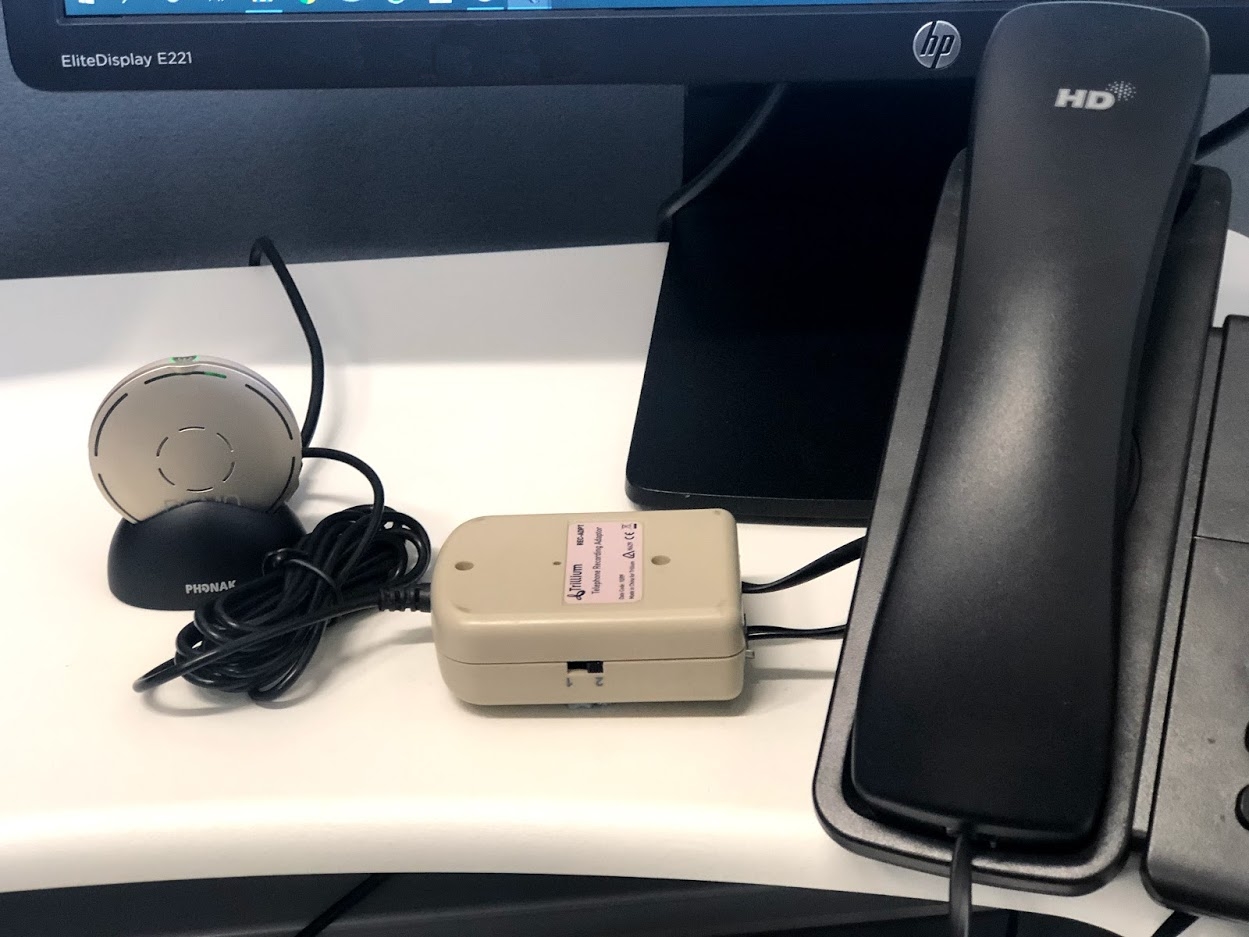
The setup with my Telephone Recording Adapter, connected directly into a Roger microphone, worked so well that it enabled me to work 2 days a week in our busy teleaudiology centre.
The reason that the telephone recording adapter is so effective is because it allows you to direct the sound you would normally hear from the telephone handset or headset directly into your hearing aid/cochlear implant via a streaming device. You are therefore receiving a superior signal to noise ratio plus you can hear the voice of the person you’re speaking to in both ears.
The only downside to using this device is that it doesn’t work with a cordless phone.
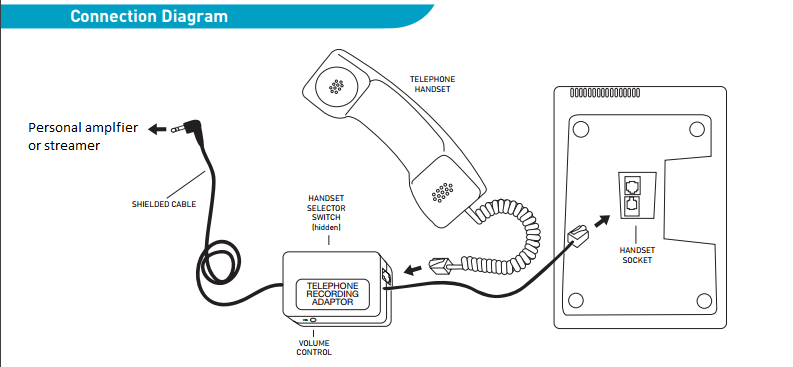
There are 5 distinct components of the Telephone Recording Adapter
- Modular handset cord
- Modular handset socket
- Audio output cable
- Handset selector switch
- Volume control
How to use a telephone recording adapter
1. Unplug the telephone line.
2. Unplug the telephone handset or headset cord from the telephone.
3. Plug the Recording Adaptor telephone handset cord into the telephone handset socket.
4. Plug the Telephone handset or headset cord into the handset socket on the Recording Adaptor
5. Plug the telephone in the telephone line and check that the handset is working normally.
6. Plug the 3.5mm recording plug into the “line-in” or “audio/aux in” socket of your streamer (This could be a Mini Mic 2 if you’re a Cochlear user, a Roger On, Roger Pen, Roger Select or any streamer that accepts direct audio input)
A telephone recording adapter can be found on amazon, ebay or most consumer electronics sites or stores.
This post was originally published on 17th June 2019








 Talking Hearing Loss
Leave a comment