
ALDs – Assistive Listening Devices (also know as Assistive Listening Technologies) are a range of technologies that can be used by individuals with hearing loss to improve their access to common audio technologies and assist them in performing daily tasks that require them to be aware of sounds in their immediate environment – usually around the home, in the workplace or in public spaces.
When it comes to watching television, it can often be difficult to understand the dialogue when you have a hearing loss. While increasing the volume will certainly make things louder, it may not make things clearer. Watching TV with others makes things even harder because a ‘comfortable’ volume for someone with hearing loss might be uncomfortably loud for the others in the room.
One effective solution to difficulties in hearing the television clearly is by using an assitive listening device. This could be in the form of a set of headphones connected to the TV via a cable or wirelessly, a personal amplifier such as the Bellman Maxi Pro or remote microphone system such as the Roger Pen or Roger Select, to name only a few.
An ALD connected to a television will give you a better signal to noise ratio. In other words more of the sound you want to hear (tv dialogue) compared to the sounds around you.
With so many sockets on a typical television, which is the best one to use with an ALD???
Analog – 3.5mm headphone socket
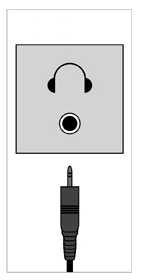
Most televisions will have a headphone output; usually a 3.5mm hole near the front or on the side of the set and sometimes it is behind a flap.
It will generally be labelled as HP, or Headphones, or Phones, or perhaps a symbol like this “Ω”.
In the majority of cases, using this socket will cut out sound from the speakers on the TV, in other words silence in your living room which is not so good if you have others who want to hear the TV also.
Some TVs don’t cut out the sound, and some models even have a separate menu control for the headphone output although this is rare.
Using the 3.5mm headphone socket also relies on your TV volume being set and left at a moderate level. If you turn your TV volume all the way down, you might have no sound through your headset and will in effect be running two volume controls which could get confusing.
Analog – RCA
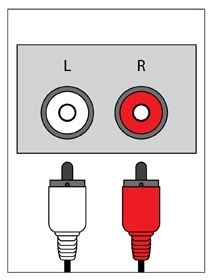
Most TVs will have a bunch of sockets at the back/rear/side, most of which will be INPUTS, designed to allow you to plug in and watch all sorts of video products such as Game consoles, Blurays, DVDs, VCRs, etc.
Usually there will be just one set of audio outputs which may be labelled as AUDIO OUTPUT L/R or MONITOR OUTPUT L/R. The key thing you are looking for are the words OUTPUT or OUT next to a pair of sockets labelled perhaps Left and Right (usually Red and White in colour). Sometimes they are grouped with a third Yellow socket but you can safely ignore this one.
Unlike using the 3.5mm headphone socket, the RCA connectors DO NOT cut out the sound from the TV speakers so this would be a preferred method if you would like to watch a program with others.
Digital – Coaxial or Optical
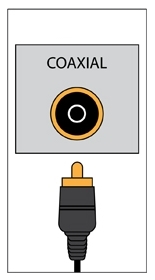
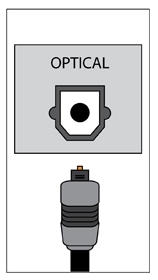
Most, if not all flat screen TVs these days will have a digital audio output which can either be in the form of a coaxial or optical socket.
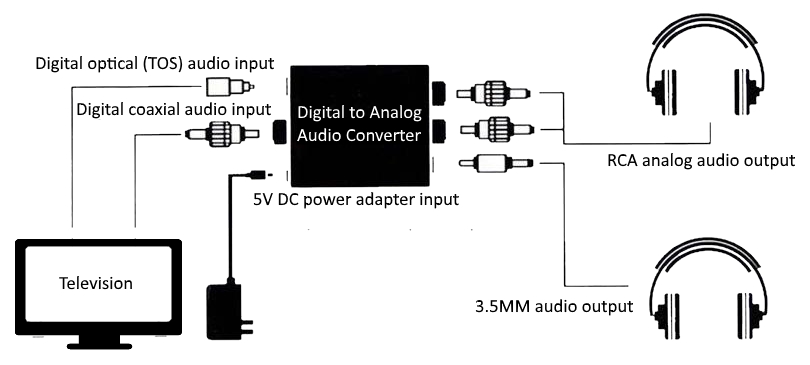
The challenge however, especially when trying to connect to an ALD, is that not all will offer the connections required to receive digital output. (in other words the 3.5mm plug on your headphones can not connect into the digital sockets of your TV). In this case, you will need to use a digital to analogue audio converter (see next topic)
Using the digital output of your TV will offer High Definition sound and does not cut out the sound from the TV speakers which makes it great for a movie night with friends and family.
Digital to Analog Audio Converter
As stated, not all ALD’s have connectors to go into a digital socket so the only option is to use a DAAC (Digital to Analog Audio Converter)
One side of the DAAC connects to the television via a Digital Optical or Digital Coaxial cable and the other side has sockets to connect into an Analog 3.5mm or RCA plug/s.
The DAAC usually needs to be plugged into AC power also.






 Talking Hearing Loss
Leave a comment